Sales Management Software: The System Every SMB Needs to Scale Revenue

TL;DR. A sales management system is software that unifies point-of-sale, inventory, invoicing, and rep performance data into a single source of truth. It replaces the spreadsheets and disconnected tools that create blind spots in a sales operation. According to Workday, 20251, poor inventory visibility alone can cost businesses 8–12% of annual revenue. When pipeline data, stock levels, and commission records live in separate systems, leaders lose the real-time view they need to stop revenue leakage before it compounds.
What Is a Sales Management System and Why It Matters to Revenue

A sales management system is the operational backbone that unifies point-of-sale data, inventory tracking, invoicing, and sales team performance into a single real-time record. The alternative — three or four disconnected tools that someone has to reconcile by hand every week — isn’t really an alternative at all 2. When those functions live in separate spreadsheets and apps, every sale has to be re-entered, re-checked, and re-explained before it becomes usable data.
That fragmentation isn’t a minor inconvenience. Acumatica’s SVP of Partner Sales, Sean Chatterjee, has observed that many small and midsized businesses stall or fail to reach their growth potential for one specific reason: they delay acting while competitors modernize their operations. Doing nothing, he argues, is itself the expensive choice 3.
The compounding costs show up in predictable places:
- Invoices delayed because sales data has to be manually transferred into accounting.
- Inventory write-offs from stock counts that no longer match what’s actually on the shelf.
- Leads that go cold because no one has a live view of where they sit in the pipeline.
None of this is a discipline problem. It’s what happens when the tools your team uses were never built to talk to each other. The fix isn’t asking reps to update three systems faster — it’s giving leads a single system that captures and routes them automatically. Closing exactly that gap is what our Leads module in Play2sell SalesOS was built to do.
Learn more in our complete guide: What is a Sales Operating System: the loop that transforms results.
Related reading: Sales performance management software.
Key Features a Good Sales System Must Include
A good sales system unifies five capabilities — point-of-sale, inventory, invoicing, reporting, and team performance tracking — into a single source of truth. It doesn’t scatter them across a CRM, a spreadsheet, and someone’s memory. Miss any one of these, and the gaps show up fast: cash-flow surprises, disputed numbers at month-end, or both.
The five non-negotiables
| Capability | What it must do |
|---|---|
| POS | Capture every transaction in real time, feeding inventory and reporting instantly1 |
| Inventory | Flag stockouts and overstock before they cost sales or tie up cash2 |
| Invoicing/finance | Reconcile payments automatically, eliminating manual entry errors3 |
| Reporting | Show live dashboards on sales trends and team activity, not month-old snapshots4 |
| Governance | Enforce audit trails and role-based permissions so compliance is structural5 |
Poor inventory visibility alone costs small businesses 8–12% of annual revenue, according to Workday, 20252. Fragmented systems compound that loss. When sales, inventory, and finance live in separate tools, nobody has one clean number to act on.
This is precisely the governance gap Play2sell SalesOS’s Pay module exists to close: automatic splits, performance bonuses, and audit trails sitting above your CRM — not buried in a spreadsheet nobody trusts.
How to Choose the Ideal Sales System Based on Business Size and Type

The right sales system matches your company’s size, complexity, and growth stage — not the vendor’s most impressive feature list. Buying more platform than you need creates the same drag as buying too little: unused modules, confused reps, and data nobody trusts.
| Business stage | Headcount | What you actually need |
|---|---|---|
| Solopreneur / micro | 1–5 | Lightweight, cloud-first POS with mobile capability and basic reporting4 |
| Small-to-medium | 6–50 | Real-time multi-location inventory visibility, team performance tracking, accounting integration2 |
| Larger SMB / enterprise | 50+ | Modular, API-first architecture that scales without vendor lock-in5 |
A full ERP deployment for a five-person team is overhead nobody asked for. But a growing retail or wholesale operation without real-time inventory sync across locations is flying blind — and that gap shows up directly in cash flow6.
Before you commit to any platform, answer four questions. How many locations do you run? How many transactions happen daily? How complex is your commission or incentive structure? And which existing systems — CRM, accounting, payroll — must the new layer talk to without replacing them?
Commission complexity is exactly where Play2sell Pay earns its place: automated splits, performance bonuses, and audit-ready governance instead of a spreadsheet three people argue over every month.
What Are the Leading Sales Management Systems on the Market?
The sales management software market splits into three tiers — free CRM-first tools, mid-market POS/inventory platforms, and full ERP suites. Each tier trades off cost against the operational depth a growing sales team actually needs.
| Tier | Examples | Strength | Gap for sales ops |
|---|---|---|---|
| Free / entry CRM | Zoho, Wave | Low cost, fast setup | No true POS or inventory; offline sales need manual sync or integration work 5 |
| Mid-market | Shopify POS, Square, Lightspeed Retail | Strong POS and real-time inventory sync 7 | Invoicing, reporting, and team performance live in separate add-ons or partner apps 2 |
| Full ERP | NetSuite, Acumatica, Microsoft Dynamics 365 | Unifies inventory, accounting, CRM in one source of truth 3 | Requires in-house IT, longer rollout, higher total cost — justified mainly past 100+ employees with multi-division complexity 5 |
Before picking a tier, score each option against four criteria: setup time, learning curve, cost of required integrations, and — critically — how deep its sales and team-performance tracking actually goes. Order management alone isn’t enough.
None of these tiers were built to answer the question a VP of Sales actually has: who on the team is performing, and is the commission math behind it defensible? That question lives in a layer above the stack — which is exactly where Play2sell SalesOS’s Pay module sits, delivering auditable splits and bonuses regardless of which CRM or ERP tier you land on.
Should Your Sales System Be Online, Offline, or Hybrid? When to Use Each
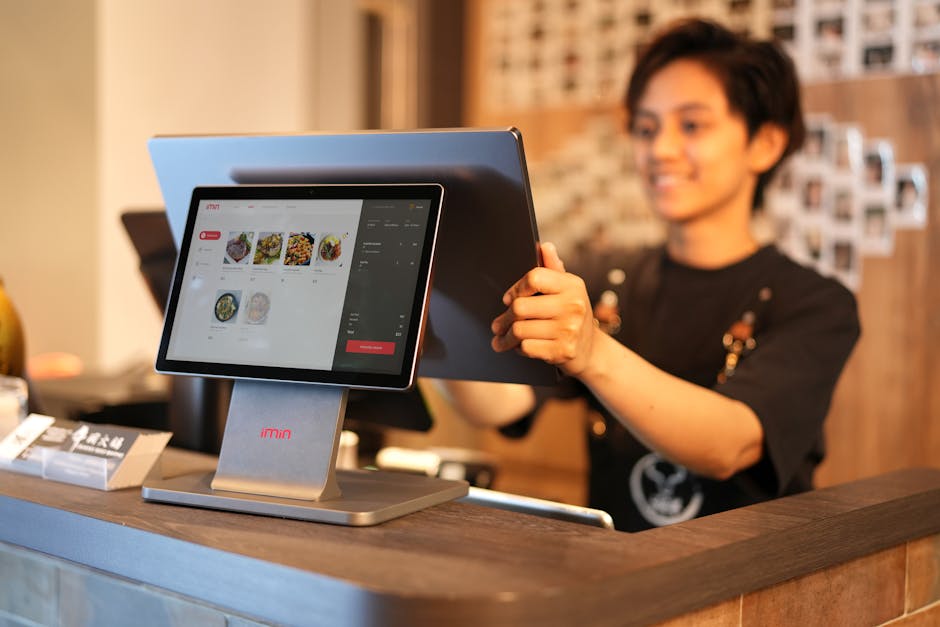
Your deployment choice should match where your sales activity actually happens — not the other way around. Cloud, on-premise, and hybrid each solve a different operational constraint. Pick the wrong one, and it quietly taxes your team every day.
The three deployment models
| Model | Best for | Trade-off |
|---|---|---|
| Cloud (SaaS) | Mobile sales teams, distributed locations, SMBs without IT staff | Depends on internet; lower upfront cost, automatic updates 8 |
| On-premise | Strict compliance, legacy system dependencies, full data control | Higher upfront investment, manual updates, in-house IT required 2 |
| Hybrid | Retail, automotive, and field sales with intermittent connectivity | Moderate upfront cost; captures offline, syncs once reconnected 8 |
Cloud systems let distributed teams log activity from anywhere, with no server to maintain 8. On-premise suits businesses that need full control over data and infrastructure 2. Hybrid architectures keep working offline and reconcile automatically once connection returns. That makes hybrid the safest default when connectivity in the field isn’t guaranteed 8.
Base your decision on team mobility, data sovereignty rules, internet reliability at each location, and whether you have dedicated IT support 2. This is exactly why Leads, inside Play2sell SalesOS, captures events via integration regardless of connection gaps — so your pipeline data stays accurate whether a rep is online at a desk or offline at a dealership lot.
What Integrations Matter Most? Marketplaces, Online Stores, and Payment Methods
A true sales management system is one where every channel — storefront, website, and marketplace — writes to the same inventory and revenue ledger in real time, so stock counts and sales totals never diverge. Anything less creates silent gaps between what you think you sold and what actually happened.
Why single-channel data breaks at scale
Retailers now sell across physical stores, e-commerce platforms, and marketplaces like Amazon or eBay. Each channel keeps its own inventory and sales record unless you integrate it into one system9. A POS that doesn’t sync stock in real time across these channels risks overselling, understocking, or losing sales outright9.
What to check before you commit
| Integration area | What it must do |
|---|---|
| Payments (Stripe, Square, PayPal) | Feed transaction and customer data back automatically — not via manual export10 |
| Marketplaces (Shopify, Amazon) | Pull orders and inventory bidirectionally to prevent overselling8 |
| API | Documented, with pre-built connectors for your core channels8 |
This is precisely the gap Play2sell SalesOS’s Leads module closes. It captures sales events directly from your existing systems via API and webhook, so pipeline and revenue data stay accurate without reps re-entering anything by hand.
How Much Does Sales Management Software Cost in the United States?

Sales management software in the United States typically costs $50 to $3,000+ per month depending on scale. Full ERP deployments start above $1,000 per month, plus five- to six-figure implementation costs. The right number depends less on headcount than on how many systems you’re trying to replace.
| Tier | Monthly Cost | Best Fit |
|---|---|---|
| Entry POS + inventory | $50–$200 | Single-location small business 7 |
| Mid-market multi-location | $300–$1,500 | Growing retail/sales teams 11 |
| Full sales management (performance, reporting, integrations) | $500–$3,000 | Teams needing visibility into rep activity 12 |
| Enterprise ERP | $1,000+ plus $10,000–$100,000+ setup | Multi-entity operations 2 |
Don’t price by the subscription line alone. A realistic total cost of ownership includes per-user fees, add-ons, implementation, training, and the ongoing admin hours someone spends keeping the system clean. Licensing alone typically runs $15–$75 per user monthly, before add-ons 12. Payback on a full ERP deployment generally takes 18–36 months 2. None of these tools, however, solve the root problem: they store data, they don’t generate it. That’s why reps still don’t fill them in.
How Do You Implement a Sales System Successfully in Your Company?
A successful rollout is a sequenced project, not a weekend software swap: you plan, configure, test, train, and measure in distinct phases, each with its own owner and exit criteria. Skipping a phase is the single biggest reason implementations stall. CRM and sales-system projects fail at rates credible sources put anywhere from 18% to nearly 70%13. The cause is usually poor change management and undefined success metrics — not the software itself.
- Plan — Map your current sales and inventory workflows. Audit the data quality already sitting in your CRM or spreadsheets, list must-have features, and get leadership to sign off on a timeline and measurable goals before anyone touches a configuration screen.
- Configure — Set up products, pricing, tax rules, user roles, and integrations with the vendor. Bring the reps and managers who will actually use the system to the table — not just IT.
- Test — Run the new system in parallel with the old one for two to four weeks on a slice of real sales and inventory activity. This catches configuration errors before full rollout.
- Train & Go-Live — Train every user on the new workflow, set a firm go-live date, and keep a support line open for the first two weeks while tracking adoption daily.
- Measure — Track adoption, accuracy, time saved, and revenue or inventory impact at 30, 60, and 90 days. Adjust configuration based on what the data and the team tell you.
As one CRM vendor puts it bluntly, customers struggle more with process definition than software setup14. That’s exactly why Phase 1 matters more than any feature on the spec sheet.
What Are the Most Common Mistakes When Choosing or Using a Sales System?

The most common mistakes when choosing or using a sales system fall into five buckets: over-buying complexity, migrating dirty data, skipping role-specific training, bolting on integrations as an afterthought, and failing to set a baseline before go-live. None of these are people problems. They’re structural failures, and each one is avoidable if you sequence your decisions differently.
| Mistake | Why it derails the rollout | Fix |
|---|---|---|
| Over-engineering | Enterprise ERP features delay go-live and outpace a 10-person team’s actual workflow2 | Buy for today’s volume; confirm the platform can scale later2 |
| Dirty data migration | Importing incomplete legacy records reproduces old errors and breaks trust on day one15 | Audit and cleanse data before cutover15 |
| Weak training | Low adoption, not missing features, is cited as the leading cause of failed CRM rollouts13 | Train daily users first, with role-specific sessions |
| Siloed integrations | Connecting only accounting while skipping payments or marketplaces leaves manual gaps16 | Map every integration before contract signing16 |
| No baseline metrics | Without pre-project KPIs, ROI becomes arbitrary and unprovable13 | Record cycle time, order accuracy, and invoicing lag before launch13 |
Prosci, a recognized authority on organizational change, found that projects with excellent change management are six times more likely to meet their objectives than those without it13 — a gap most training budgets never account for.
Frequently Asked Questions
Choosing, deploying, and scaling a sales system raises the same five questions for almost every SMB operator. Here are direct, practical answers.
How long does it take to implement a sales system?
Most small and mid-sized businesses go live in 4 to 12 weeks, depending on system complexity and how clean your existing data is. Run the old and new systems in parallel for 2 to 4 weeks. That reduces the risk of a disruptive cutover and gives your team a safety net while they adjust 2.
Can I keep my existing CRM and add a sales system on top?
Yes — a sales system and a CRM solve different problems, so they should integrate, not compete. A CRM manages customer relationships and prospect history. A sales system handles the operational layer: POS, inventory, and invoicing. The two need to connect via API so data flows both ways 17.
What if my internet goes down?
Confirm offline capture before you buy. Hybrid and cloud-first systems should let you keep ringing up sales during an outage and sync automatically once connectivity returns, rather than stopping operations cold 8.
How do I avoid overpaying for features I don’t need?
Start lean — POS, inventory, and invoicing — and add modules only as your process matures. Run a simple impact-versus-effort assessment before adding anything 12.
What’s the most common reason implementations fail?
Low user adoption. It typically stems from inadequate training or change management, not technology itself 13.
Transform Your Sales System Into a Revenue Engine
Fixing your sales system only works if the fix gets used — which means the data has to capture itself, not depend on reps remembering to log it. That’s the real structural gap in most sales operations: 63% of SMBs still run with departments siloed from each other, so a lead or order generated in one place takes significant time to surface anywhere a manager can act on it18. A pipeline nobody re-enters correctly isn’t a training problem. It’s a design problem.
This is exactly the gap Play2sell SalesOS Leads is built to close. It sits above your existing CRM or POS and captures every transaction event — a call logged, an order placed, a lead created — via API and webhook, then distributes that lead intelligently by rep performance and geography. No one has to type it twice. The pipeline you see is the pipeline that exists, because it’s assembled from the system of record automatically rather than reconstructed from memory at month’s end.
The payoff compounds. When routing, activity tracking, and commission visibility all run through the same layer, adoption stops being a mandate you have to enforce. It becomes the path of least resistance14.
Next step: Schedule a short conversation with our team to audit how lead distribution and pipeline visibility work in your operation today — and see exactly where the manual handoffs are costing you revenue.
## Sources- How Inventory Management Software Drives Small Business Growth — https://blog.workday.com/en-ca/how-inventory-management-software-drives-small-business-growth.html ↩
- How to Choose the Right ERP System for Your Business — https://www.windwardsoftware.com/blog/how-to-choose-the-right-erp-system-for-your-business ↩
- Business Software Solutions for the 9 Small Business Challenges — https://www.acumatica.com/blog/small-business-operational-challenges ↩
- Inventory Management Challenges and Tips for Small Businesses — https://www.uschamber.com/co/co-brandstudio/pos-nation/inventory-management-tips-for-small-business ↩
- ERP Software Comparison 2026 — https://xentral.com/en/erp-lexicon/erp-systems-comparison ↩
- 7 Types of Inventory Risk and Their Impact On Your Business — https://www.unleashedsoftware.com/blog/7-types-of-inventory-risk-and-their-impact-on-your-business ↩
- https://www.euvic.com/us/post/pos-systems — https://www.euvic.com/us/post/pos-systems ↩
- POS Systems for Retail: How to Choose the Right One | Celerant — https://www.celerant.com/blog/pos-systems-for-retail-how-to-choose-the-right-one ↩
- Top 10 Must-Have Features in the Best Retail POS Software — https://www.logicerp.com/blog/top-10-features-of-the-best-retail-pos-system-software-the-ultimate-guide ↩
- 81 Best Software Solutions for US Small Businesses – TimeTrex — https://www.timetrex.com/blog/81-best-software-solutions-for-u-s-small-businesses-in-2025 ↩
- https://www.gofrugal.com/blog/best-erp-systems — https://www.gofrugal.com/blog/best-erp-systems ↩
- https://www.act.com/blog/best-small-business-crm-software-features-pricing-and-implementation-guide — https://www.act.com/blog/best-small-business-crm-software-features-pricing-and-implementation-guide ↩
- https://www.fusion5.com/au/microsoft/blogs/crm-implementation-fails — https://www.fusion5.com/au/microsoft/blogs/crm-implementation-fails ↩
- https://www.pipedrive.com/en/crm/compare/crm-tool — https://www.pipedrive.com/en/crm/compare/crm-tool ↩
- 10 best sales management software for small businesses — https://www.zendesk.com/blog/sales/getting-started-sales-management-everything-need-know/sales-management-software-small-businesses ↩
- Top 10 Sales Management Software — https://dynamics.folio3.com/blog/sales-management-software ↩
- https://euclidz.com/blog/crm-vs-sales-management-software — https://euclidz.com/blog/crm-vs-sales-management-software ↩
- Mistakes of Small and medium business, ConvergeHub — https://www.convergehub.com/blog/five-mistakes-are-putting-smbs-back-foot ↩